Features of Mozart
Illustrations of some of Mozart's more prominent features
This page summarises various features of Mozart, largely through graphical illustrations
Entering and editing music
Mozart is designed for speed of music entry:
To this effect Mozart automates standard default note-spacing, bar-line entry, and beaming of groups of notes.

Mozart gives you four methods of entering notes:
From the QWERTY keyboard; from Mozart's Ribbon Bar, from Mozart's piano keyboard toolbar; or from a connected MIDI instrument.
 "Type in" your music very rapidly with Mozart's wide range of keyboard shortcuts, or...
 ...there's a Windows Ribbon Bar for entering and editing music with the mouse, or...
 ...enter notes with Mozart's virtual piano keyboard tool, or with a connected MIDI keyboard.
Scope and Illustrations
Mozart's scope includes:
music for piano and organ, transposing instruments, and percussion;
chord, chord-shape, and tablature notation for plucked strings;
shape-note notation.
Illustrating: classical piano music

Illustrating: guitar chords and percussion

Illustrating: jazz font, transposing instruments

Illustrating: triplets, crescendo, and guitar tablature

Illustrating: shape note singing

Many more illustrations can be found in these pages:
Symbols
Mozart boasts a comprehensive selection of music symbols,
many illustrated here by their buttons from Mozart's Ribbon Bar, though most have easily memorable keyboard equivalents including
F=forte; Shift+F=fortissimo; P=piano; .=staccato;
_=tenuto; +=sharpen; -=flatten; ... and so on.


...and more!
Score and Parts
In Mozart a score and its parts are completely integrated.
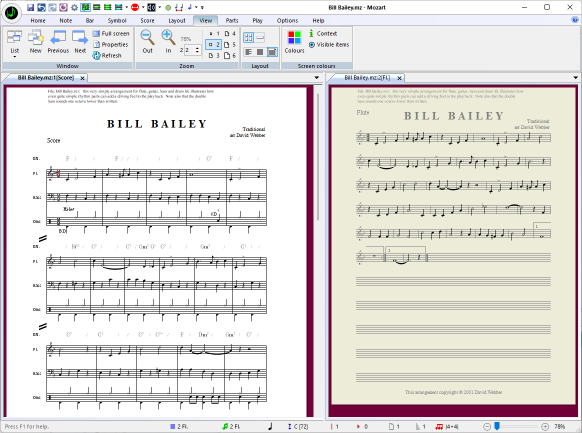
The score and its instrumental parts may be viewed simultaneously
and editorial changes to the score are automatically included in the parts and vice versa.
In doing this it may be convenient to show a part side-by-side with the score. To assist editing in
this configuration, the music in the currently inactive window is now shown with a darker
background.
 Help!
Help!
Mozart has an extensive (8MB) integral, structured Help system
with contents, index, and search facilities. This is available whether you're on or off line.
File formats
Mozart's native format is .mz and in addition:
Mozart can export:
- musicXML
- abc
- MIDI
- wav
- mp3
Mozart can import:
- musicXML
- NIFF
- abc
- MIDI
MusicXML
Mozart supports MusicXML, the open standard for exchanging music notation
between different software programs.
See
MusicXML & Mozart Music Notation Software
Play-back
Mozart provides play-back of your notated music at the touch of a button.
provingin an instant "aural preview" of the music you have entered.
See Playback in Mozart Music Notation Software
Mozart
Free Mozart evaluation
If you haven't tried Mozart, please take a look at the fully functional, free evaluation copy:
![[]](../image12/tile-mozartblue.gif)
Mozart
Evaluation
![[]](../image12/tile-summary.gif)

 Copyright © 1995-2026 David Webber.